Document Management – Attaching Files
You can add documents to objects, sequences and tests. These documents are file attachments such as images (.jpg, .jpeg, .png, .bmp), PDF documents (.pdf), Word documents (.doc, .docx) or Excel documents (.xls, .xslx). Any number of documents can be added. These documents are saved to an application folder. The folder’s storage location can be specified in setup under “Global Settings”.
Viewing Documents
If a document already exists or if it’s possible to create a document, the document icon  appears in the toolbar. The document window is displayed by clicking this icon. This window is divided into two parts. The currently selected document is displayed at the top. All of the object’s available documents are displayed at the bottom.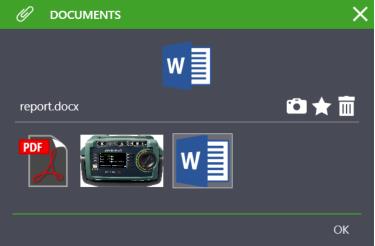
After clicking one of the documents at the bottom it’s selected, transferred to the top display and its file name is shown. The document is then opened in the corresponding application by clicking it. Icons for photographing

, creating

and deleting

documents are located on the right-hand side of the top window. Click “OK” to close the window.
Creating Documents
An icon for creating new documents
is located on the right-hand side of the document window. By clicking the icon, a document of the above-mentioned type can be created using the menu provided by the system for opening files. Click “OK” to return to the initial page.
Deleting Documents
An icon for deleting documents
is located on the right-hand side of the document window. In order to delete a document, it must first be selected in the bottom section and can then be deleted by clicking the
icon. Click “OK” to return to the initial page.
